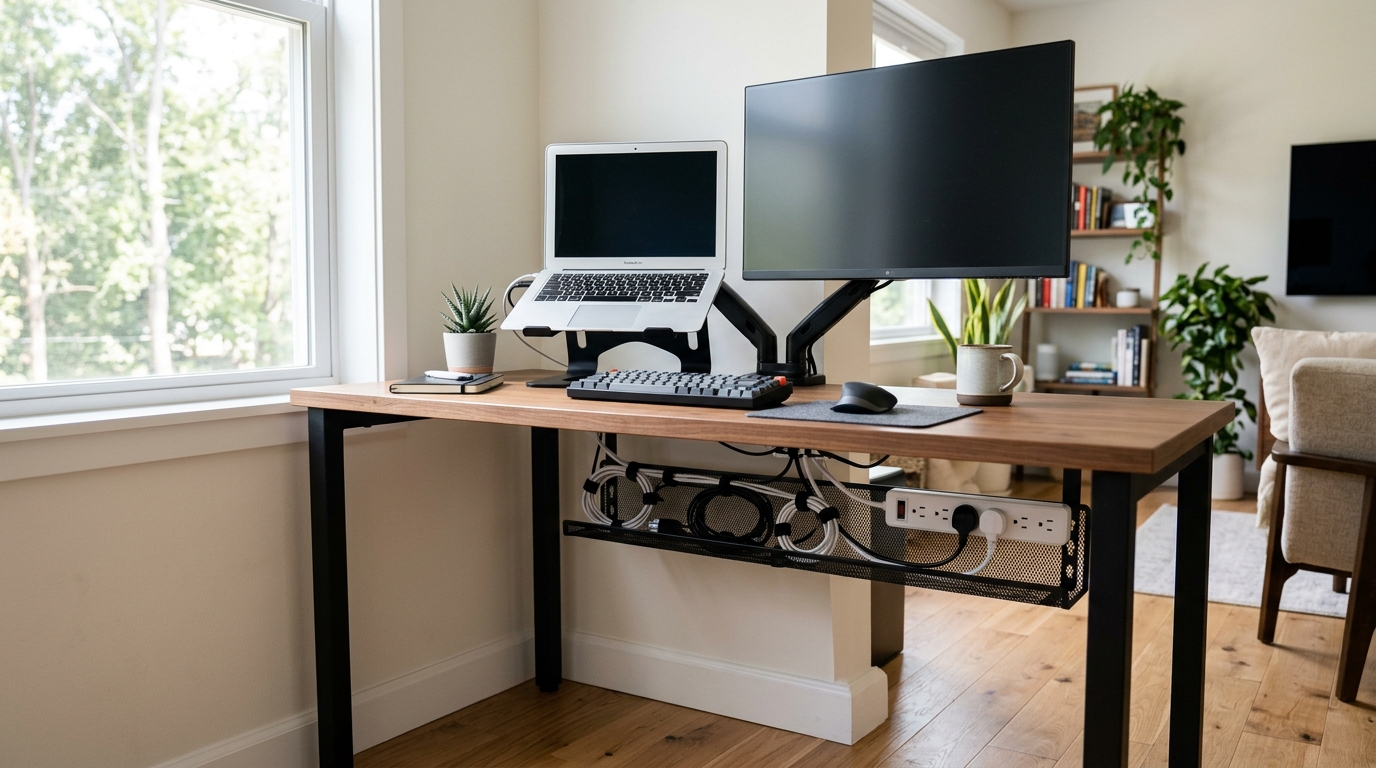
Small desks turn cable chaos into a real problem fast. A monitor cable, a laptop charger, a phone lead and a power strip can swallow the little surface you have left, and the tangle under your knees is often worse than the mess on top. Dangling cords crowd your foot zone, snag chair wheels, and turn a standing desk converter into a rope trap every time you raise it. Once the cables are gone, the surface still needs a home for pens, drives and notes — see our desk organizers for small desks.
Quick Answer
Cable clutter on small desks steals legroom and snags chair wheels. The fix takes one evening: unplug and sort cables, lift the power strip off the floor with an under-desk tray, and sleeve runs that cross open space. Most small desks carry five to eight cables once obsolete cords are removed, and three moves—power strip elevation, tray routing, and sleeving—deliver roughly 80 percent of the cleanup result.
This guide walks through a six-step cleanup that fits any desk under 55 inches wide. It assumes the desk already sits somewhere sensible — our small-apartment desk placement guide settles that first. The tools cost roughly $8 to $40 each, and the whole job takes an evening. Recommendations rest on published specs and owner reviews rather than hands-on testing, so treat every price as a range and check the current listing before you order.
Why Cable Clutter Matters on a Small Desk
Cable mess is not just a looks problem. On a compact desk, every cord that drops below the surface edge steals legroom you need to sit close enough to type with your elbows near 90 degrees. Most ergonomics guides call for at least 20 inches of clear knee space under the desk; a power strip lying on the floor with a knot of adapters on top eats a large slice of that.

There is a quieter cost too. On a sit-stand desk or converter, loose cables drag with the moving platform on every height change. Over months, that flexing kills cheap charging cables at the connector and pulls wall warts out of sockets mid-task. Smart routing protects both your posture space and your gear.
Three moves deliver roughly 80 percent of the result: lift the power strip off the floor, tuck the heavy cable runs into an under-desk tray, and sleeve everything that still crosses open space.
Step 1: Unplug Everything and Sort Into Three Piles
Pull every plug from the wall and every cable from your devices. Sort them into three piles: things that never move (monitor, desktop, router), things that move daily (laptop charger, phone cable, headphones), and things that are obsolete — that third HDMI you have not touched since 2022. The last pile goes in a drawer or the recycling bin. Most small desks carry five to eight cables once the ghosts are gone, and that number is easy to manage.
While everything is unplugged, wipe dust off the under-desk surface. Clamps and adhesive mounts both grip far better on a clean edge, and you will not redo the job in a month.
Step 2: Mount the Power Strip Where You Cannot See It

A power strip on the floor is the biggest clutter generator under a small desk. Mount it to the underside or clamp it to the edge, out of the foot zone entirely. The Desk Clamp Power Strip with USB-C, 3 Outlets (white, 6.5-foot cord) clamps onto desktops up to about 2 inches thick, which suits thin small-desk tops and standing desk converters alike. Three AC outlets plus USB-C and USB-A ports handle a laptop, a monitor and phone charging without a second brick in sight. Expect to pay roughly $20 to $30 — check the current price.
Mount it near the back edge, facing the wall, so plugs slide in horizontally instead of dangling toward your knees. Leave the strip’s own cord long enough to reach the wall socket without tension.
Step 3: Add an Under-Desk Tray for the Heavy Cables
With power sorted, gather the fat cables — monitor, desktop, router, long USB runs — and lift them into a tray clamped under the surface. Two no-drill options cover the size spectrum. The ZhiYo 17-Inch Under Desk Cable Management Tray (3 inches wide, 4.7 inches tall, black steel) holds about 11 pounds and fits desk edges up to roughly 2.5 inches thick, making it the natural pick for a 40- to 47-inch desk where a long tray would look odd. The KEEGH 36-Inch Under Desk Cable Management Tray is the heavy-duty route: a three-level clamp grips edges from 0 to 2.5 inches, and the longer steel channel swallows a power strip plus every static cable on a wider desk. Prices typically run $15 to $25 for the ZhiYo and $25 to $40 for the KEEGH — check current listings.

Position the tray 6 to 10 inches from the front edge so it stays reachable but out of knee range. Drop cables in from the top, coil excess length inside the channel, and let only the plugs emerge at the ends.
Step 4: Sleeve the Cables That Must Stay Visible

Some cables cannot hide: the laptop charger that travels with you, the phone cable you grab hourly, the cord running to a monitor arm base. Bundle those into one tidy trunk instead of five wandering snakes. The Alex Tech 25-Foot, 1/2-Inch Cord Protector Wire Loom Sleeve is a split braided tube that wraps around four or five standard cables at once. Cut it to the exact length you need, zip-tie the ends, and the run reads as a single black cable. It is one of the best-selling cable sleeves on Amazon, with thousands of units moving per month, and it typically costs $8 to $15 — check the current price.
Measure each visible run before cutting. A sleeve 4 inches too long looks worse than no sleeve at all, and the split design makes trimming painless.
Step 5: Corral Chargers, Wall Warts and Docks
Chunky adapters and docking stations refuse to lie flat. If they must live on the surface, give them one contained home. A Large Cable Management Box with Protective Sleeve (the HomeBliss model, black with a wood-style lid) hides a power strip or a cluster of wall warts inside while cables exit through cutouts on both sides; it doubles as a neat anchor point for phone and tablet charging. Expect to pay roughly $20 to $35 — check the current price. Keep one box max on a small desk; a second one signals that you need to cut cables, not contain them.
Step 6: Leave Slack for Standing Desks and Converters
If your setup rises and falls during the day, every cable needs a service loop — extra length that moves with the desktop instead of fighting it. Leave 12 to 24 inches of coiled slack per cable at sitting height, and route that loop behind the tray so it feeds out as the surface climbs. Clamp-on power strips and trays make this dramatically easier: cables anchored to the moving surface travel with it, and only the wall-side cord stretches. Converters add one more wrinkle — a platform that rises 15 inches needs cables that reach a bit further, so test the full height range before finalizing the routing.
Quick Comparison: 5 Cable Management Tools for Small Desks
| Product | What It Does | Best For | Typical Price |
|---|---|---|---|
| ZhiYo 17-Inch Under Desk Cable Tray | Clamp-on steel tray, holds 11 lb | Desks under ~47 inches wide | $15–$25 (check current price) |
| KEEGH 36-Inch Under Desk Cable Tray | 3-level clamp, large channel | Wider desks, heavy cable loads | $25–$40 (check current price) |
| Alex Tech 25-Foot Cable Sleeve | Split braided loom, cut to length | Bundling visible cable runs | $8–$15 (check current price) |
| Desk Clamp Power Strip with USB-C | 3 outlets + USB, clamps to desk edge | Getting power off the floor | $20–$30 (check current price) |
| Large Cable Management Box (HomeBliss) | Wood-lid box hides wall warts | Surface-level chargers and docks | $20–$35 (check current price) |
Prices above are typical ranges at the time of writing, so always check the current listing before ordering.
FAQ
How do I manage cables on a desk I am not allowed to drill?
Clamp-on gear solves this without a single hole. The ZhiYo and KEEGH trays both clamp onto desk edges up to 2.5 inches thick, and the power strip mounts the same way. For anything that must stick, use removable adhesive clips rated for the cable weight and test one for 24 hours before committing.
How much cable slack do I need for a standing desk?
Plan for 12 to 24 inches of coiled slack per cable at sitting height. Anchor cables to the moving desktop or converter and leave only the wall-side cord to stretch. Test the full height range after routing — a converter that rises 15 inches will expose any cable that is too short.
What is the fastest way to tidy a small desk?
Unplug everything, remove dead cables, then do three things in order: mount the power strip under the desk, drop static cables into an under-desk tray, and sleeve the cables that still cross open space. Most people finish in under an hour, and it removes roughly 80 percent of visible clutter.
Do cable sleeves damage the wires inside?
Split braided sleeves like the Alex Tech loom are safe for standard USB, HDMI and power cables. They flex with the bundle, and the split opening lets you add or remove a cable without unplugging the rest. If the sleeve bulges, split the bundle into two runs rather than overstuffing.
Related Guides
- Under-desk keyboard trays that free up small desk space
- Monitor risers that raise your screen and add storage
- Standing desk converters built for tight spaces
Shop These Picks on Amazon
Ready to compare prices? These links open Amazon listings for the specific products covered in this guide, so you can check current models and prices yourself. If you buy through them, we may earn a small commission at no extra cost to you — it helps keep RemoteErgoLab free. As an Amazon Associate we earn from qualifying purchases.
- ZhiYo 17in Cable Management Under Desk Tray, 3in W x 4.7in H, Black on Amazon
- KEEGH Under Desk Cable Management Tray 36, No Drill Cord Organizer, Black on Amazon
- Alex Tech 25ft 1/2 inch Cord Protector Wire Loom Tubing Cable Sleeve on Amazon
- Desk Clamp Power Strip with USB C, 3 Outlets Desktop Mount Power Station, 6.5 ft Cord, White on Amazon
- Large Cable Management Box with Protective Sleeve (Black) on Amazon
Disclosure
RemoteErgoLab is reader-supported. When you buy through links on our site, we may earn an affiliate commission. As an Amazon Associate we earn from qualifying purchases. All product recommendations are based on published specs, user reviews, and research — we do not claim to have tested every item ourselves.