
An under-desk drawer on a standing desk has to be a screw-in model: the top moves, so adhesive and clamp-on organizers have nothing solid to hold, and all four picks here bolt to wood or MDF at least 0.47 in thick. The VIVO Under Desk Lockable Drawer (13.1 x 14.3 x 7.2 in, 11 lb load) suits most compact frames, the Mount-It! Large Pencil Drawer (21.25 in wide, 23 x 16.25 in clearance) fits wide tops, and the Penn Elcom EX-6171B (1.8 in high, 2 keys) locks a 20 in laptop away.
As an Amazon Associate we earn from qualifying purchases. Product links on this page go to Amazon; picks are chosen from published manufacturer specifications, not paid placement.
Quick Picks
- Best Overall: VIVO Under Desk Lockable Drawer — Lockable storage for small standing desks
- Best for Wide Desks: Mount-It! Large Under Desk Pencil Drawer — Full-width pencil and office supply storage
- Best Low-Profile: Mount-It! Deep Under Desk Storage Drawer — Slim desks that need shallow storage
- Best for Laptops: Penn Elcom Under Desk Laptop Drawer EX-6171B — Locking away a laptop up to 20 inches
How We Chose Screw-In Drawers for Standing Desks
We checked the four ASINs in this guide against their live Amazon listings on 26 October 2026 and kept only models whose mounting requirements are published as numbers: minimum top thickness (0.47 in on the Mount-It! Deep, 3/4 in on the VIVO, 1 in on the Mount-It! Large), clearance (23 x 16.25 in for the Mount-It! Large, 28.25 in of width for the Deep), drawer height (1.6 in to 7.2 in) and load rating (11 lb on the VIVO, 22 lb total desk load). We excluded adhesive and clamp-on organizers because none of them publishes a hold rating for a top that travels through a standing-desk height range, and we dropped any model that did not state a required top thickness.
Under-Desk Drawer Comparison for Standing Desks
Side-by-side comparison of the four screw-in drawers shows the trade-off between compact lockable boxes and full-width trays. VIVO suits smaller tops, Mount-It! models need more width, and Penn Elcom targets laptop security.
| Product | Mount / Slides | Size / Clearance | Capacity / Storage | Desk Requirement |
|---|---|---|---|---|
| VIVO Under Desk Lockable Drawer | Screw-in to underside, steel | 13.1 x 14.3 x 7.2 in outer; 9.6 x 12.6 x 2.3 in inner | 11 lbs load; keyed lock | Min 3/4 in thick; 22 lbs desk load needed |
| Mount-It! Large Under Desk Pencil Drawer | Screw-in, ball-bearing slides | 21.25 in wide; 23 x 16.25 in clearance | 4 compartments | Fits 25 to 28 in desk depth; min 1 in thick |
| Mount-It! Deep Under Desk Storage Drawer | Screw-in, steel frame | 25.8 in wide; 28.25 in width clearance; 12.5 in deep; 1.6 in high | 4 compartments, largest 9 x 9.5 in | 0.47 in or more, wood or MDF only |
| Penn Elcom Under Desk Laptop Drawer EX-6171B | Screw-in, ball-bearing slides | 1.8 in high; fits 20 in laptops or smaller | Steel; lock with 2 keys | Not listed |
Four Screw-In Drawers That Fit Standing Desks
All four drawers in this guide bolt to the underside of a wood or MDF top, and the fit differences are all in numbers: drawer width runs from 21.25 in (Mount-It! Large) to 25.8 in (Mount-It! Deep), height from 1.6 in to 7.2 in, and the minimum top thickness from 0.47 in to 1 in. Measure the usable width between your standing desk’s legs, the front-to-back depth behind the crossbar, and your top thickness before you drill — the Mount-It! Deep, for example, needs 28.25 in of width even though the drawer itself is 25.8 in wide.
VIVO Under Desk Lockable Drawer
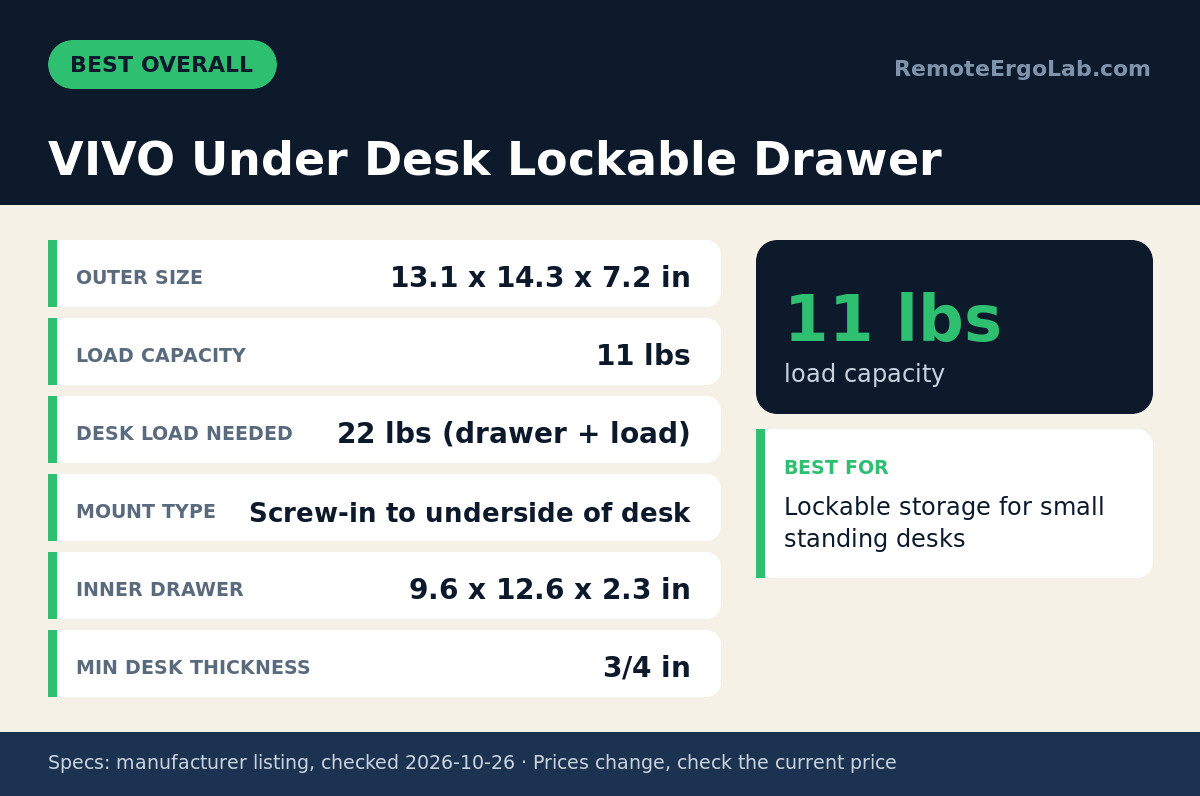
VIVO Under Desk Lockable Drawer is the most versatile pick for standing desks under 55 inches wide. The outer size measures 13.1 x 14.3 x 7.2 inches, including side brackets, with an 11.5-inch body that leaves legroom on narrow tops. Usable space inside is 9.6 x 12.6 x 2.3 inches, enough for a notebook, passport, external drive, pens, and a small calculator. The manufacturer lists an 11-lb load capacity and requires a desk that can support 22 lbs combined. Minimum desk thickness is 3/4 inch, which covers most laminate standing-desk tops. The steel housing uses screws into the underside and includes a keyed lock for shared rooms. One limitation is depth: the 14.3-inch footprint plus brackets can crowd desks less than 24 inches deep if you also use a keyboard tray for small desks. Skip it if you need full-width storage for letter files or a 15-inch laptop.
Mount-It! Large Under Desk Pencil Drawer
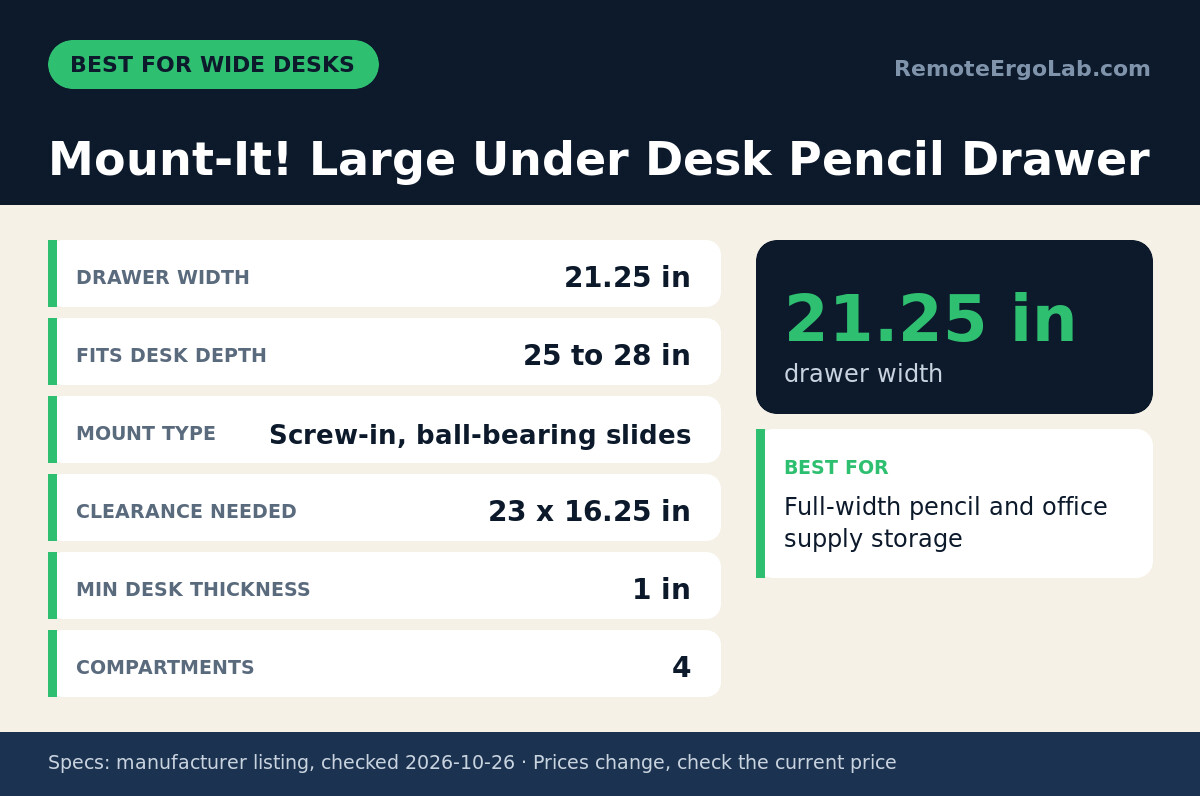
Mount-It! Large Under Desk Pencil Drawer fits wide standing desks that need organized shallow storage. The drawer spans 21.25 inches wide and needs 23 x 16.25 inches of clear space under the top, with ball-bearing slides for smooth opening. Four compartments keep pens, sticky notes, chargers, and tools separated instead of piled in one bin. The manufacturer specifies fit for desks 25 to 28 inches deep and a minimum top thickness of 1 inch, which is thicker than many budget lifting tops. Backed by a lifetime manufacturer warranty, the design centers under the desk to balance weight during height changes. The honest limitation is size and thickness: the listing does not state load capacity or outer height, so check the listing for knee clearance if you are over 6 feet tall or sit high. Skip it if your desk is thinner than 1 inch, less than 25 inches deep, or has a crossbar where the drawer would sit.
Mount-It! Deep Under Desk Storage Drawer
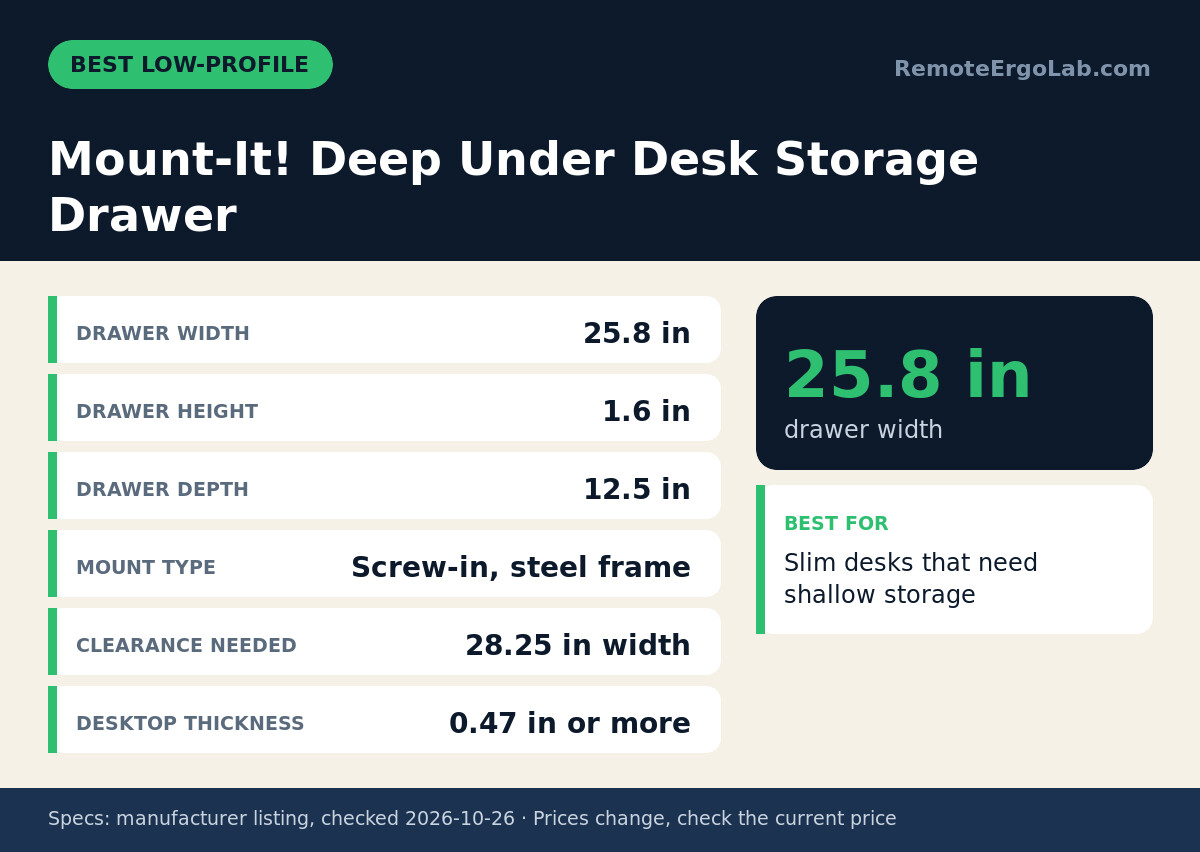
Mount-It! Deep Under Desk Storage Drawer is the lowest-profile full-width option in this group. The steel frame measures 25.8 inches wide, needs 28.25 inches of width clearance, and extends 12.5 inches front to back with only a 1.6-inch drawer height. Four compartments include a 9 x 9.5-inch bay plus 3.4-inch and 1.5-inch strips for pens and USB sticks. Minimum desktop thickness is 0.47 inch or more in wood or MDF only, so the drawer suits thinner tops that cannot take the 1-inch requirement of its larger sibling. Pairing this drawer with a monitor riser for small desks keeps small supplies off the surface without adding desktop clutter. The limitation is published capacity: the listing does not state load capacity, lock support, or slide type, so check the listing for those details. Skip it if you need locking storage or have less than 29 inches of clear width between frame parts.
Penn Elcom Under Desk Laptop Drawer EX-6171B
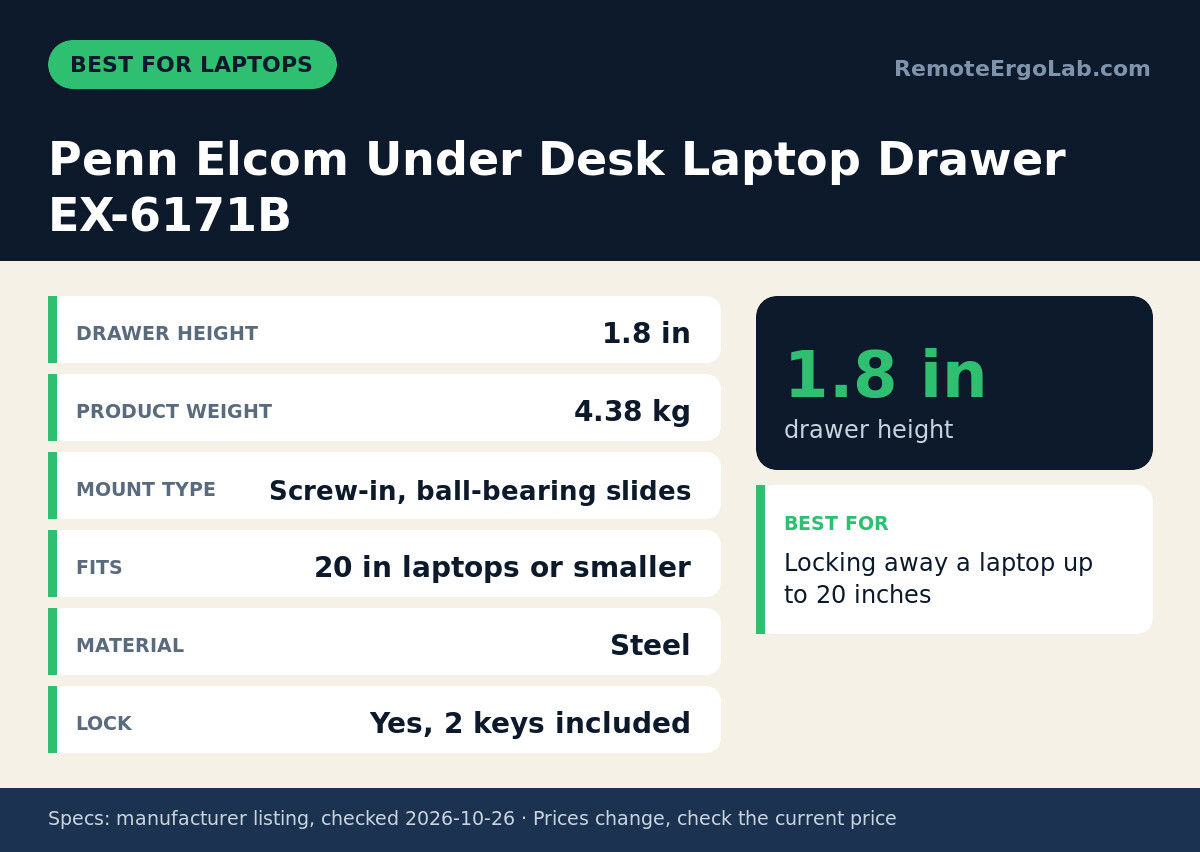
Penn Elcom Under Desk Laptop Drawer EX-6171B serves remote workers who want to lock a laptop under a standing desk. The steel drawer accepts laptops 20 inches or smaller, with a 1.8-inch drawer height that accommodates many 14-inch to 16-inch machines plus a slim sleeve. Ball-bearing slides support daily open-close cycles, and a built-in lock comes with 2 keys included. Product weight is 4.38 kg, so the unit itself adds meaningful mass under the top — verify your desk frame rating and screw grip before mounting. Users who dock a laptop to an external screen can combine this drawer with one of the Best VESA Laptop Trays for Monitor Arms (2026): 4 Picks for daytime use and locked storage after hours. The limitation is missing fit data: the listing does not state outer width, depth, clearance, minimum desk thickness, or load capacity. Skip it if you cannot confirm those measurements or need divided storage for stationery.
Who Should Skip These Under-Desk Drawers
Skip-all cases for these screw-in drawers involve glass, hollow-core, or ultra-thin tops that cannot hold screws. None of the four picks clamp on, so renters who cannot drill, desks with full-width modesty panels, and frames with a center crossbeam blocking the 12- to 16-inch depth zone should look elsewhere. Skip screw-in models if your desk is under 22 inches deep and you already use a thick keyboard tray, since knee clearance drops fast. Consider a freestanding file pedestal, a wall-mounted cabinet, or one of the 5 Dual Monitor Standing Desk Converters (2026) with side storage instead of forcing an undermount.
Under-Desk Drawer Buying Guide for Standing Desks
Fit checks for an under-desk drawer start with three tape-measure numbers: top thickness, clear width, and usable depth. Measure thickness at the edge or cable hole, then match it to the minimums here — 3/4 inch for VIVO, 1 inch for Mount-It! Large, 0.47 inch wood/MDF for Mount-It! Deep, and unstated for Penn Elcom. Measure clear width between legs and lifting columns at both sitting and standing height, allowing 1 inch extra beyond the 23-inch or 28.25-inch clearance figures. Measure depth from the front edge to any crossbar, control box, or cable tray.
Height and movement checks prevent knee knocks on standing desks. Allow at least 2.5 to 3 inches below the top for the drawer body plus your thighs, and sit in your normal chair with feet flat to confirm clearance. Center wide drawers left-to-right to avoid tipping feel when the desk rises. Pre-drill pilot holes with the correct bit for particleboard or MDF, use all supplied screws, and keep total drawer plus contents within the listed 11-lb limit where given. If you mount a monitor arm on the same top, review Monitor Arm Wobble on Thin Desks: Steel Plate Fixes and Best Monitor Arms for Ultrawide Monitors 2026: 5 Picks to balance clamping force on thin tops.
FAQ
Can you add drawer to standing desk without drilling?
No — none of the four picks here installs without drilling. Adhesive and clamp-on organizers exist, but no maker in this group publishes a hold rating for a desktop that rises and falls, so we did not include one. All four models screw into the underside of wood or MDF: the Mount-It! Deep needs a top of at least 0.47 in and refuses crossbars, the VIVO needs 3/4 in, and the Mount-It! Large needs 1 in. If drilling is banned, use a rolling pedestal or a desktop organizer instead.
What size drawer fits under a 48-inch standing desk?
A 48-inch standing desk typically fits the 11.5-inch VIVO body or the 21.25-inch Mount-It! Large drawer if depth is 25 to 28 inches. The 25.8-inch Mount-It! Deep needs 28.25 inches of width clearance, so verify space between legs first. Always measure before ordering.
Will an under-desk drawer hit my knees or keyboard tray?
Knee interference depends on drawer height, mounting position, and your seated height. Shallow models at 1.6 to 2.3 inches high preserve more legroom than deeper boxes. Mount the drawer toward the back half and test with your chair and keyboard tray in place.
Can a standing desk lift the extra weight of a drawer?
Check the frame rating, then do the arithmetic: the VIVO drawer adds a maximum of 22 lb to the desk — 11 lb of drawer plus 11 lb of contents — and that is the only load figure the four makers publish. Keep power bricks and reference books out of the drawer, distribute weight across the mounting screws, and remember that a drawer hung near the front edge adds leverage that a centre-mounted load does not.
Which under-desk drawer locks for shared offices?
Two of the four lock: the VIVO Under Desk Lockable Drawer uses a keyed lock, and the Penn Elcom EX-6171B ships with 2 keys and holds a 20 in laptop in a 1.8 in high steel tray. Neither Mount-It! model lists a lock, so treat both as open storage. For a shared office, the Penn Elcom is the only pick sized for a laptop as well as documents.
Shop These Picks on Amazon
Ready to compare prices? These links open the Amazon listings for the specific products covered in this guide, so you can check current models and prices yourself. If you buy through them, we may earn a small commission at no extra cost to you — it helps keep RemoteErgoLab free.
- VIVO Under Desk Lockable Drawer on Amazon
- Mount-It! Large Under Desk Pencil Drawer on Amazon
- Mount-It! Deep Under Desk Storage Drawer on Amazon
- Penn Elcom Under Desk Laptop Drawer EX-6171B on Amazon
Related Guides
Sources and Spec Checks
- VIVO Under Desk Lockable Drawer — source: , checked on .
- Mount-It! Large Under Desk Pencil Drawer — source: , checked on .
- Mount-It! Deep Under Desk Storage Drawer — source: , checked on .
- Penn Elcom Under Desk Laptop Drawer EX-6171B — source: , checked on .
Disclosure
As an Amazon Associate we earn from qualifying purchases. RemoteErgoLab picks products from published specifications and fit criteria; we have not physically tested the products in this guide. Prices and availability change, so check the current listing before you buy.
Featured image: Photo: Andrew Pons (CC cc0 1.0, via Openverse).