
Quick Answer
For laptop ergonomics the Logitech MX Keys S Combo is the best all-round set — typically $180-$220 for a low-profile keyboard paired with the MX Master 3S (8K DPI, three-device switching). The Ergo K860 with the Lift Vertical Mouse ($170-$210) is the split-and-vertical option for wrists that already complain, and the wired Perixx PERIBOARD-512B ($30-$45) is the cheapest split keyboard here.
Top pick: Logitech MX Keys S Combo — typical ≈ $180-$220 · Check current price on Amazon
Comparison Table
| Product | Type | Connection | Key Features | Typical Price |
|---|---|---|---|---|
| Logitech MX Keys S Combo | Low-profile keyboard + mouse | Bluetooth / Logi Bolt receiver | Smart backlighting, 3-device switching, MX Master 3S with 8K DPI | Typically $180-$220 (check current price) |
| Logitech Ergo K860 + Lift | Split keyboard + vertical mouse | Bluetooth / Logi Bolt receiver | Curved split keyframe, pillowed wrist rest, 57° vertical mouse | Typically $170-$210 (check current price) |
| Logitech MX Master 3S | Ergonomic mouse | Bluetooth / Logi Bolt receiver | 8K DPI, tracks on glass, quiet clicks, USB-C, fast scrolling | Typically $90-$110 (check current price) |
| Perixx PERIBOARD-512B | Split keyboard (wired) | USB-A cable | Fixed wrist rest, natural typing angle, no setup needed | Typically $30-$45 (check current price) |
Quick Picks
Four setups stand out after combing through specs and thousands of owner reviews:
- Best overall set: Logitech MX Keys S Combo — a low-profile backlit keyboard paired with the MX Master 3S mouse, talking to up to three devices at once.
- Best split ergonomic bundle: Logitech Ergo K860 with the Lift Vertical Mouse — curved split keyframe plus a 57-degree vertical mouse for wrists that already complain.
- Best mouse-only upgrade: Logitech MX Master 3S — 8K DPI tracking that works on glass, quiet clicks, USB-C battery life measured in months.
- Best budget pick: Perixx PERIBOARD-512B — a wired split keyboard with a fixed wrist rest for typically under $45.
Why a Laptop Keyboard and Trackpad Are the Problem
Laptops win on portability and lose on posture. The screen sits low, so you hunch forward to see it. The keyboard is shallow, and the trackpad drags your thumb into an awkward sweep all day. None of that is your fault — it is geometry.
Ergonomics guidelines keep repeating the same numbers: elbows near 90 degrees, wrists straight, forearms roughly parallel to the floor. A laptop alone cannot deliver that. An external keyboard and mouse can, because they let you push the laptop back, raise the screen, and keep your arms in a neutral line. Decent ergonomic input gear starts around $30, and most of the benefit comes from separating keyboard from screen in the first place. Split layouts are the most direct fix for wrist angle — we rank them in our split keyboards for small desks.
How We Chose
This guide is built from published specifications, retailer listing data, and patterns in user reviews. Every product here had to meet four tests:
- Real ergonomic design: split, tented, or low-profile layouts that keep wrists straight, or a vertical shape for the mouse.
- Laptop-friendly connectivity: Bluetooth or a compact receiver, so a dongle does not eat your only USB-C port.
- Solid review consensus: consistently positive owner feedback on comfort over full workdays.
- Fair value: the price has to match what the hardware actually delivers.
Footprint mattered too. A full desktop keyboard on a cramped apartment desk can cause as many problems as it solves.
Reviews of the Best Keyboard and Mouse for Laptop Ergonomics
Logitech MX Keys S Combo — Best Overall Set
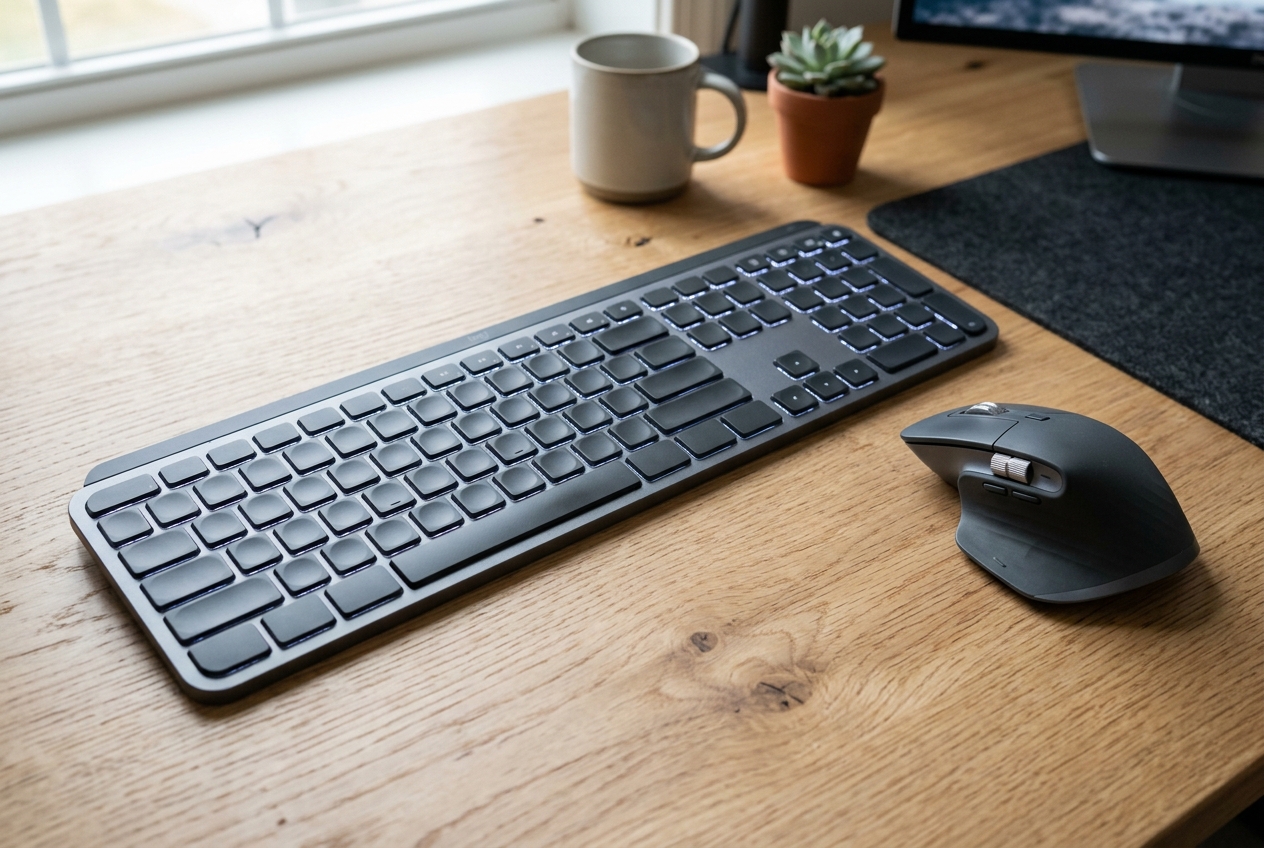
This is the set most remote workers end up recommending to each other. The MX Keys S keyboard uses a low-profile layout with concave keys, so your wrists stay flat instead of bending up to reach tall keycaps. Backlighting turns on automatically when your hands approach. The bundled MX Master 3S mouse brings 8K DPI optical tracking that glides over glass desks, plus a scroll wheel that spins free for long pages and clicks into place for precise lines.
Connectivity is the real win for laptop owners. Both devices pair with up to three computers over Bluetooth or the Logi Bolt USB receiver, and switching takes one tap. Battery life is measured in months, and both charge over USB-C. Owners describe the typing feel as quiet and soft, which matters in shared apartments. Expect to pay roughly $180–$220; check current price.
Typical ≈ $180-$220 · Check current price on Amazon
Logitech Ergo K860 + Lift Vertical Mouse — Best Split Bundle
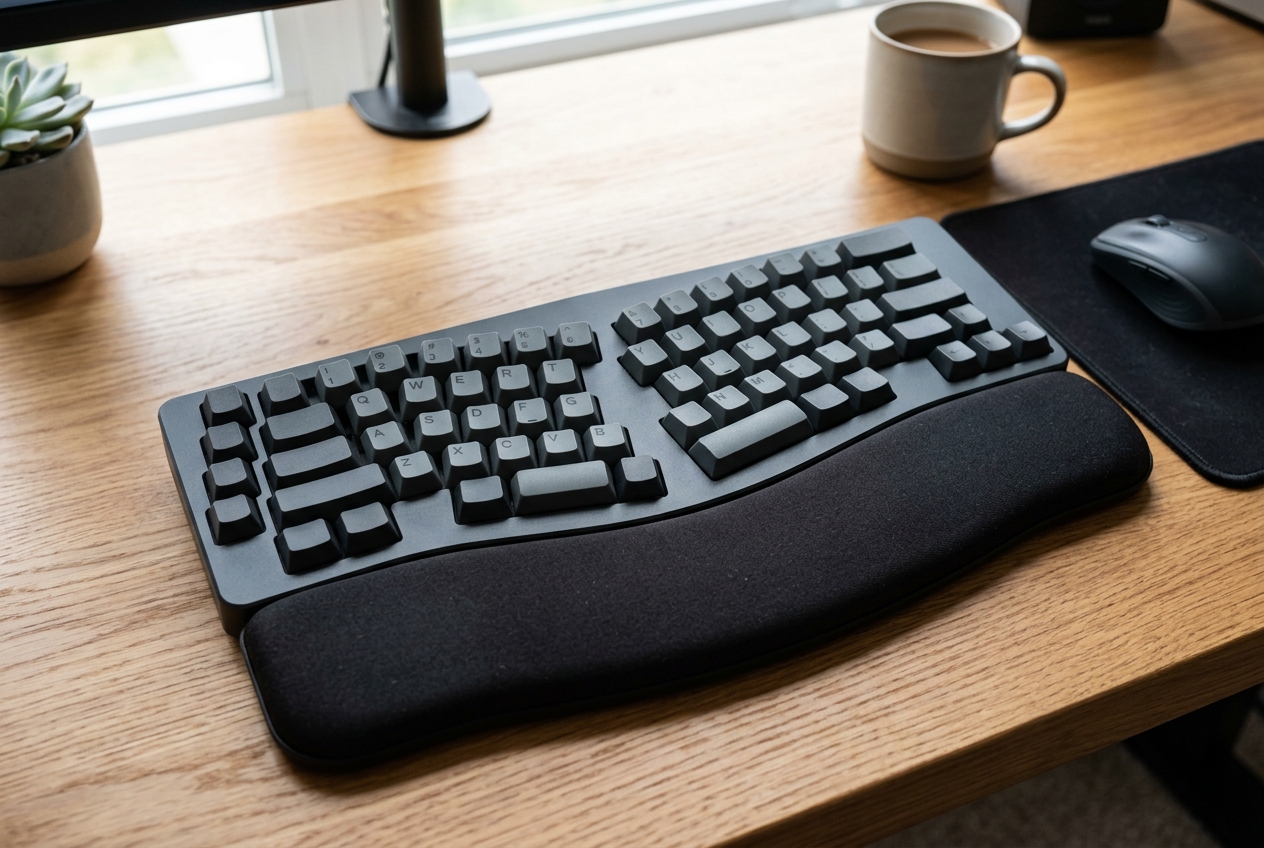
If wrist or forearm discomfort is already part of your day, a split keyboard is the more serious intervention. The Ergo K860 splits the keys into two curved zones that angle outward, letting your hands rest in a natural, shoulder-width position. A padded wrist rest runs the full width of the board, which connects to three devices on two AAA batteries.
The bundle pairs it with the Lift vertical mouse, which holds your hand in a handshake position around a 57-degree angle instead of forcing the forearm to twist flat. Together they target the two most common input-device complaints: ulnar deviation from flat keyboards and forearm rotation from flat mice. Owners note the K860 takes a few days to learn, then becomes hard to give up. Typical price for the bundle runs $170–$210; check current price.
Typical ≈ $170-$210 · Check current price on Amazon
Logitech MX Master 3S — Best Mouse-Only Upgrade
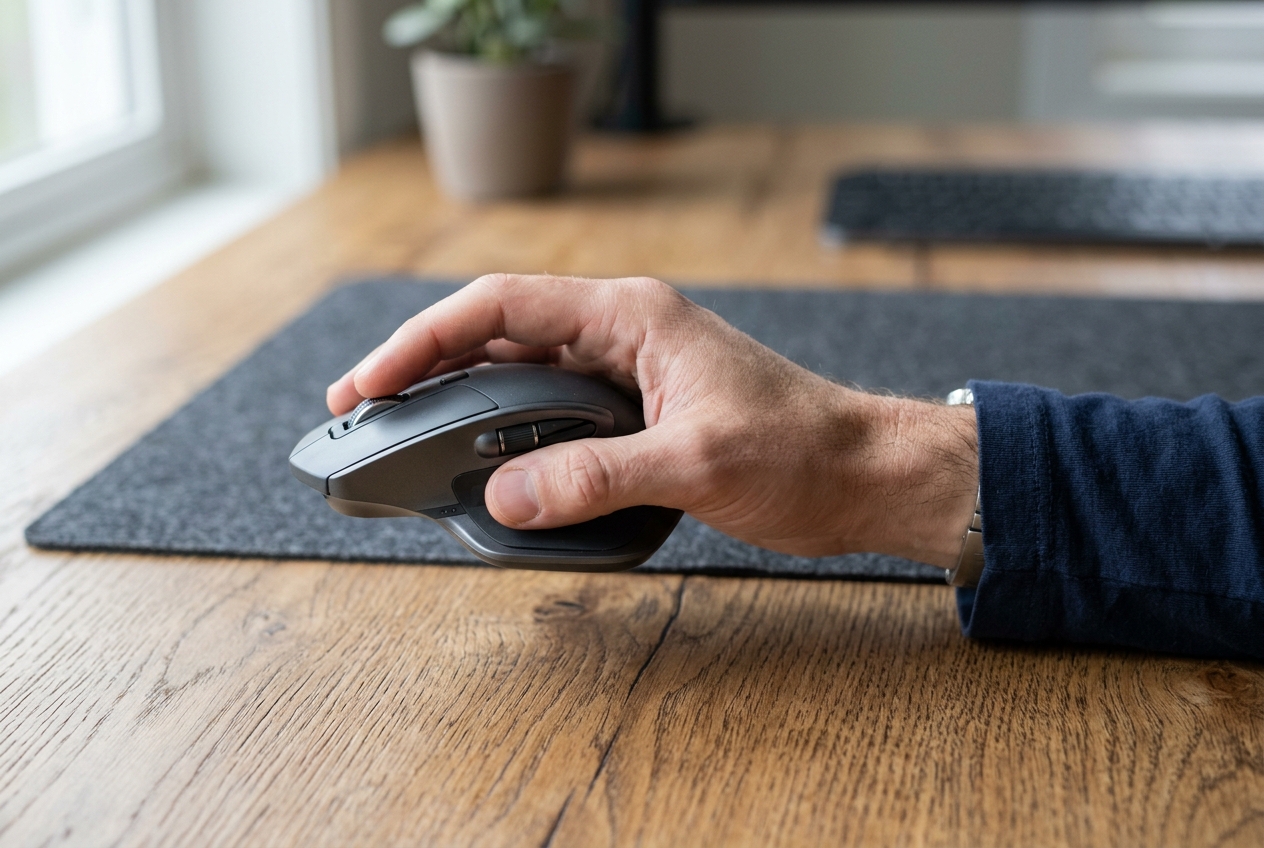
Already happy with your keyboard and just want to ditch the trackpad? The MX Master 3S is the mouse most frequently named in ergonomics forums for a reason. Its sculpted shape supports a relaxed palm grip, and the thumb rest gives your thumb a home instead of leaving it to hover. The 8K DPI sensor tracks on glass, so a desk mat becomes optional.
The MagSpeed wheel toggles between free-spin and ratcheted scrolling automatically, and the gesture button on the thumb rest can switch desktops or trigger app shortcuts. Pairing takes minutes over Bluetooth. Expect roughly $90–$110; check current price.
Typical ≈ $90-$110 · Check current price on Amazon
Perixx PERIBOARD-512B — Best Budget Split Keyboard
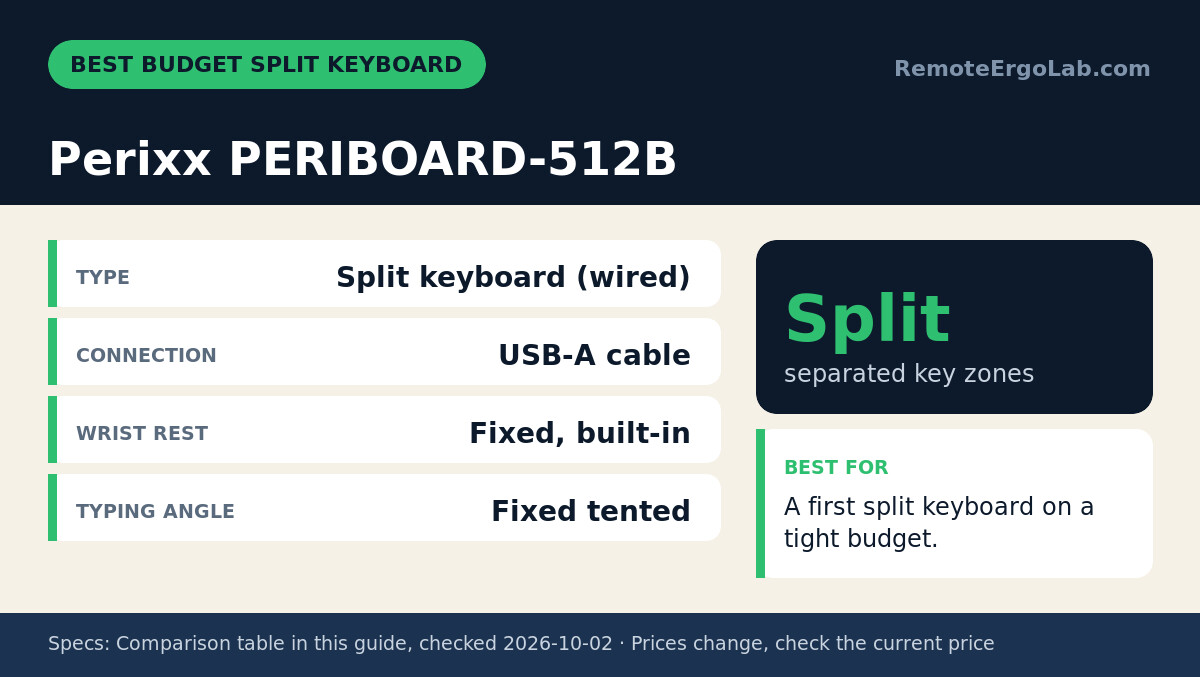
Split keyboards usually cost over $100, which makes the PERIBOARD-512B an outlier. It delivers the core ergonomic benefit — two separated key zones that let your shoulders relax — for the price of a takeout dinner. A built-in wrist rest supports your palms, and the fixed tented angle keeps wrists straighter than any flat keyboard can.
Trade-offs are honest ones. It is wired USB-A, so it suits a desk where the laptop stays put, and the key feel is standard membrane rather than premium mechanical. As a first ergonomic purchase it removes most of the risk from the decision. Budget around $30–$45; check current price.
Typical ≈ $30-$45 · Check current price on Amazon
Buying Guide: What to Look For
Split vs. Low-Profile vs. Standard
Three layouts dominate the market. Standard keyboards keep the familiar layout but do little for wrist angle. Low-profile boards like the MX Keys S reduce wrist extension and travel well with laptops. Split keyboards, whether fixed like the Perixx or adjustable like the Ergo K860, let each hand sit at its natural angle — the strongest evidence-backed option for existing discomfort. Prevention points to low-profile; ongoing wrist strain points to split.
Wired, Bluetooth, or Receiver
Laptops have few ports, so wireless matters. Bluetooth avoids dongles entirely; Logi Bolt receivers add a more stable connection. Wired is fine for a permanent desk setup.
Size and Desk Space
Measure before you buy. A full split keyboard runs roughly 45–46 cm wide, which can crowd a 100 cm desk once a monitor arm and coffee mug join in. Compact tenkeyless options save about 8 cm if you rarely use the number pad.
What About the Mouse?
Vertical mice rotate your forearm into a handshake position and suit people with forearm or wrist strain; standard ergonomic mice with a thumb rest suit everyone else. Most people adapt to a vertical mouse within a week.
FAQ
Is it worth buying an external keyboard and mouse for a laptop?
Yes, for anyone working more than a couple of hours a day. External input gear lets you raise the laptop screen to eye level — the single biggest fix for neck strain.
What is the best keyboard angle for typing?
Guidance generally points to a flat or slightly negative tilt (front edge raised) so wrists stay straight. Wrist rests should support your palms, not bear your full weight while you type.
Can I use the same keyboard and mouse with my laptop and desktop?
Models with multi-device pairing — like the MX Keys S and Ergo K860 — remember up to three paired devices and switch with a button press.
How long does it take to adjust to a split keyboard?
Expect a few days of slower typing before muscle memory adapts, and about two weeks before the split layout feels normal. A split keyboard asks your hands to learn a new home position, so the first week is always the slowest.
What is the best split keyboard for a small desk?
Among the picks in this guide, the Logitech Ergo K860 is the split keyboard that suits a compact desk best: it divides the keys into two curved zones so your hands rest at shoulder width, and it pairs over Bluetooth with no dongle. The wired Perixx PERIBOARD-512B is the cheaper split alternative if you can accept a cable and a fixed footprint.
Is a wrist rest keyboard worth it?
A wrist rest helps only when it supports your palms between keystrokes instead of carrying your wrists while you type. Used that way, the best wrist rest keyboard here is a split model with a padded rest that runs the full width, like the Ergo K860; if a rest makes your palms float above the keys, it can do more harm than good.
What is the best small ergonomic keyboard for a laptop?
For a laptop, the best small ergonomic keyboard has to be low-profile and compact. The MX Keys S is the low-profile pick here, and its flat keycaps keep your wrists closer to neutral instead of bending up to tall keys. Raise the laptop screen to eye level and the keyboard does the rest of the posture work.
Do I need a small keyboard tray?
Only if your desk is too high and cannot be adjusted. A small keyboard tray drops the keyboard below the desktop so your elbows can sit near 90 degrees; if your chair already lets you type with straight wrists, a tray adds little. For laptop users, lifting the screen and adding an external keyboard usually helps more than a tray does.
Shop These Picks on Amazon
Ready to compare prices? These links open Amazon listings for the specific products covered in this guide, so you can check current models and prices yourself. If you buy through them, we may earn a small commission at no extra cost to you — it helps keep RemoteErgoLab free.
Related Guides
- The Complete Ergonomic Home Office Setup Guide
- Ergonomic Laptop Setup Without Buying a New Desk
- The 15-Minute Home Office Ergonomics Checklist
- Best Ergonomic Mice for Small Hands — the mouse half of the input setup.
As an Amazon Associate we earn from qualifying purchases.