
Standing desks split into two families the moment you look past the marketing photos: desks you raise by hand, and desks that raise themselves with a motor. The difference shows up in price, in noise, in usable height range, and in what happens five years from now when something wears out. This guide compares both mechanisms using published manufacturer specs and patterns from owner reviews, then lines up four real desks — two manual, two electric — against the working situations each one suits.
As an Amazon Associate we earn from qualifying purchases.
Quick Verdict
Choose electric if you change heights several times a day, want preset memory, or need to adjust the desk without leaving the keyboard. Choose manual if the lowest possible failure risk matters more than convenience, and you can spare 15–30 seconds per height change. Height range decides more outcomes than mechanism does: a hand crank that reaches 45 inches works for most adults, while a budget electric desk that stops at 41 inches never will.
Quick Picks
- Luxor STANDCF48-BK/DW Crank Adjustable Stand Up Desk (best all-round manual pick — 154 lb capacity, 29.5–45.25 inch crank range, casters included)
- WALKINGDESK 4-Leg Pneumatic Adjustable Standing Desk (no motor, no cranking — squeeze a handle for infinite travel from 28.3 to 41.7 inches)
- FLEXISPOT EN1 One-Piece Standing Desk (sturdiest electric here: 48 x 30 inch one-piece top, four presets, 176 lb lift)
- FEZIBO Standing Desk 48 x 24 Inch, Maple (cheapest way into a preset-memory electric desk, 28.3–46.5 inch range)
How the Two Mechanisms Differ
Manual desks: cranks, pneumatic cylinders and gas springs
A manual desk removes the electronics completely. The Luxor crank models use a geared handle that runs the top from 29.5 to 45.25 inches and carries 154 lbs, with four 3-inch casters in the box. Pneumatic designs work differently: the WALKINGDESK four-leg frame holds an air cylinder that travels infinitely between 28.3 and 41.7 inches with a squeeze of a lever, so there is no handle spinning in a loop while you wait. Gas-spring carts are the third flavor — cheap, light, and usually capped near 27 lbs of load.
Turning effort is the honest trade-off. A crank desk needs roughly 20 to 40 turns to cover a 16-inch range, which lands at 15–30 seconds of work for a fit adult. Pneumatic lifts cut that to two or three seconds, but they top out lower, which rules them out for anyone over about 5-foot-11 who wants a true standing position.
Electric desks: motors, handsets and presets
An electric frame hides a control box and one or two lifting columns under the top. The FEZIBO 48 x 24 runs 28.3 to 46.5 inches with three memory presets and a 176 lb rating; the FLEXISPOT EN1 pushes the same capacity across a wider 48 x 30 inch surface with four presets and a 28.1–45.7 inch range. Adjustment takes seconds, usually with one hand, and the desk can be nudged an inch at a time during a call.
What you take on is power dependency and noise. Every electric desk needs an outlet or a charged pack, a control box that can fail, and a handset that adds one more thing to lose. Motor drone sits around the level of quiet conversation on most frames, which is fine on calls but noticeable in a shared room.
Which mechanism ages better
Mechanical failure modes are boring, and boring is good. A crank is a handle, a rod and a gear set; pneumatic seals can weep after years of daily travel but cost little to replace. Electric desks fail at the control box, the handset, or a column motor, and replacement parts vary wildly by brand. Published warranties reflect that: crank frames often carry five to ten years on the frame, electric electronics typically two to five years.
Comparison Table
| Desk | Mechanism | Height range | Capacity | Presets | Typical price |
|---|---|---|---|---|---|
| Luxor STANDCF48-BK/DW Crank Adjustable Stand Up Desk | Hand crank | 29.5–45.25 in | 154 lbs | None | Typically $450–$650 (check current price) |
| WALKINGDESK 4-Leg Pneumatic Adjustable Standing Desk | Pneumatic, four-leg frame | 28.3–41.7 in | Not published by brand | None | Typically $120–$170 (check current price) |
| FLEXISPOT EN1 One-Piece Standing Desk | Dual-column electric motor | 28.1–45.7 in | 176 lbs | 4 | Typically $300–$400 (check current price) |
| FEZIBO Standing Desk 48 x 24 Inch, Maple | Single-motor electric | 28.3–46.5 in | 176 lbs | 3 | Typically $230–$330 (check current price) |
The Desks Worth Comparing
1. Luxor STANDCF48-BK/DW Crank Adjustable Stand Up Desk — best manual all-rounder
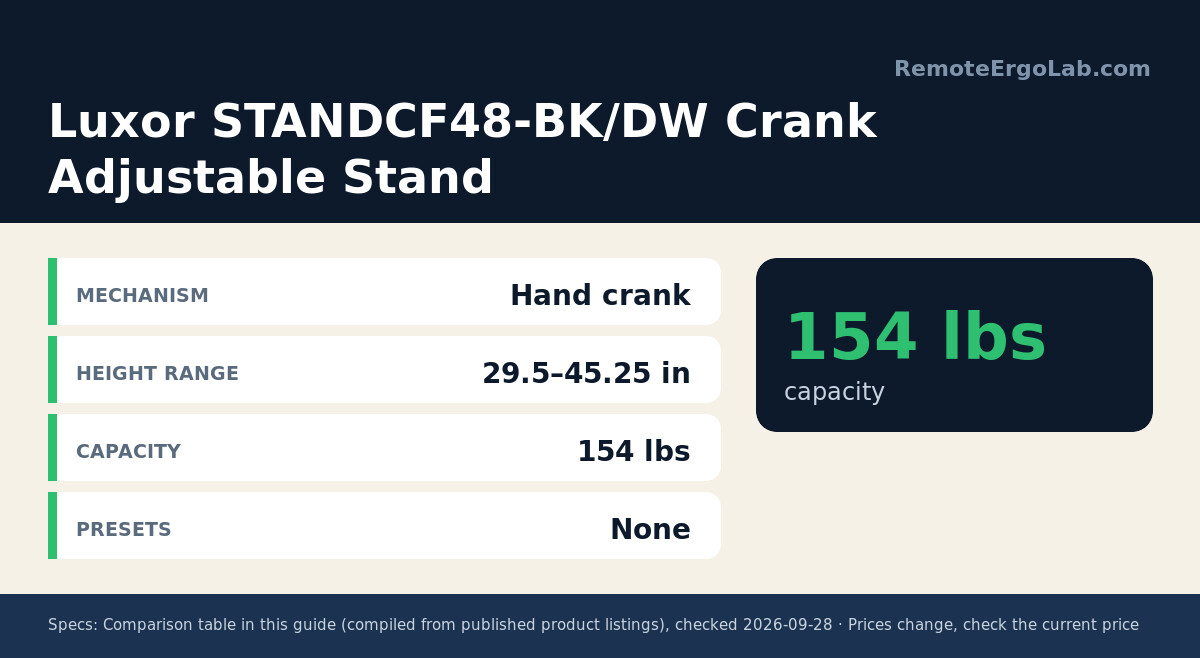
The 47.25 inch wide steel top carries 154 lbs and travels 29.5 to 45.25 inches on a side-mounted handle, so knees stay clear through the whole range. Owner reviews describe the mechanism as industrial rather than residential: slower than a motor, but with no drift and no controller to fail. Four casters ship in the box, two of them lockable, and the frame meets ANSI/BIFMA standards — unusual at this price. Assembly takes two people for the frame flip. Check the Luxor STANDCF48-BK/DW Crank Adjustable Stand Up Desk listing for the current color options and price.
2. WALKINGDESK 4-Leg Pneumatic Adjustable Standing Desk — best manual setup for small rooms
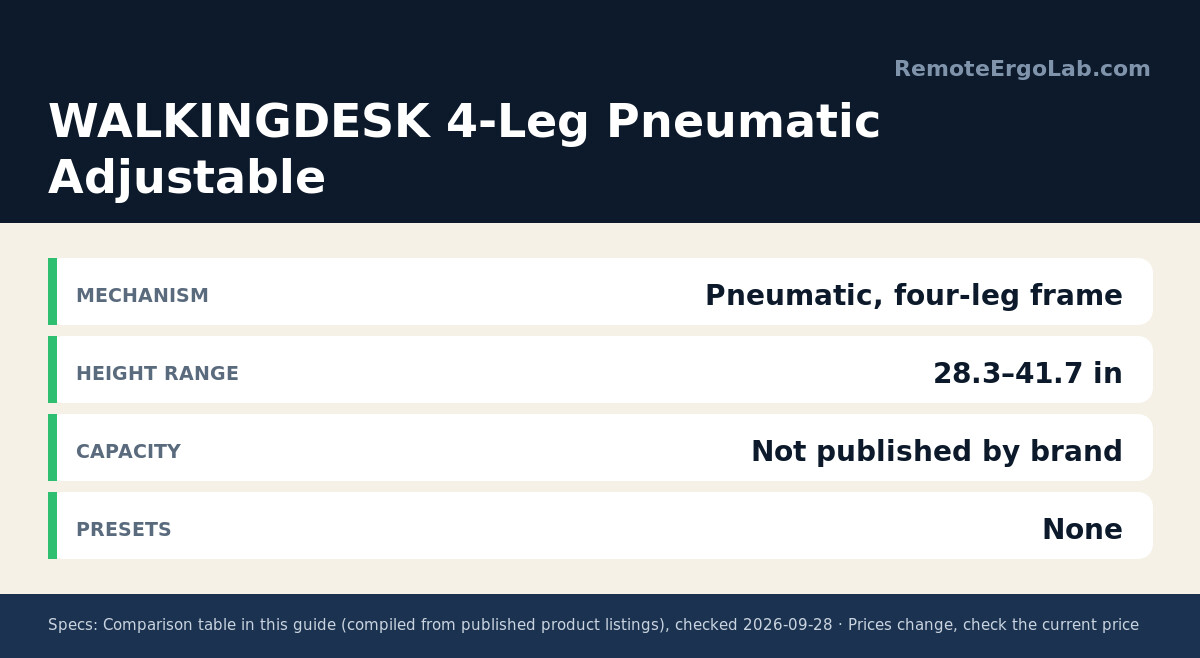
Four legs instead of two give this desk lateral stiffness that single-column pneumatic frames rarely match, and the air lift moves infinitely from 28.3 to 41.7 inches without a wire or an outlet. Available in 32 and 40 inch widths with a fabric drawer underneath, it slips into spots where a 47 inch crank desk will not fit. Clearance under the frame is generous enough to straddle a walking pad. The ceiling on height is the catch, so measure your standing elbow height before ordering the WALKINGDESK 4-Leg Pneumatic Adjustable Standing Desk.
3. FLEXISPOT EN1 One-Piece Standing Desk — best electric for dual-monitor setups
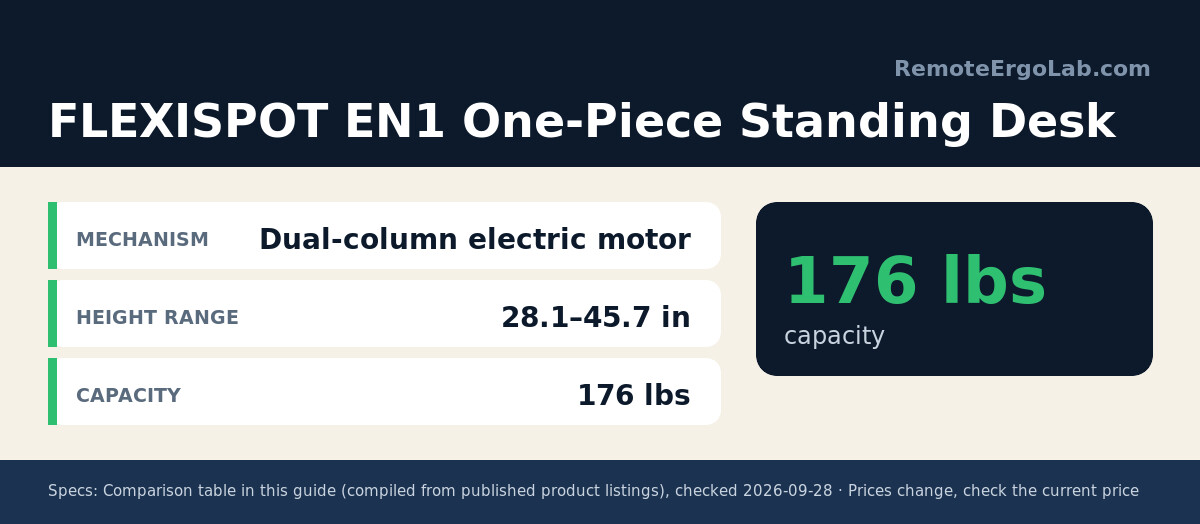
A one-piece 48 x 30 inch top removes the seam that lets cheaper two-piece desks flex in the middle, and the 176 lb lift carries two 27-inch monitors plus a laptop arm without complaint. Four presets cover sit, stand, and two intermediate heights, and the range of 28.1 to 45.7 inches fits most users between 5-foot-2 and 6-foot-1. Column travel is quick and stops precisely, which matters when you alternate positions on the hour. See the FLEXISPOT EN1 One-Piece Standing Desk listing for frame colors and bundle options.
4. FEZIBO Standing Desk 48 x 24 Inch, Maple — best electric on a budget
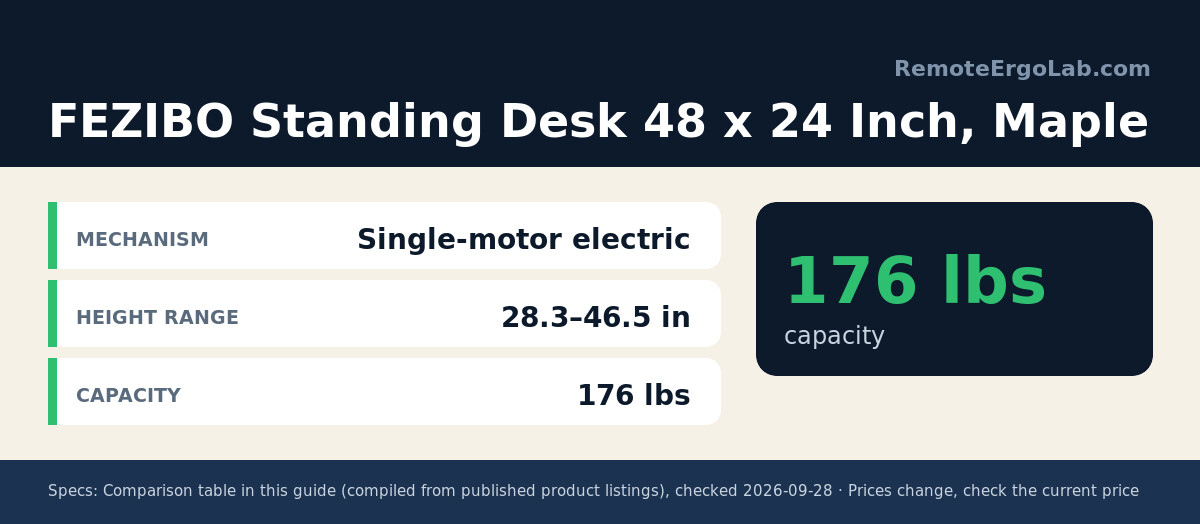
This is where electric pricing gets reasonable. The 47.2 x 23.6 inch top reaches 46.5 inches — higher than either manual desk here — with three presets and a 176 lb rating, and the steel frame has a crossbar that keeps side-to-side sway modest for a single-motor design. The narrower 23.6 inch depth leaves less room for a keyboard tray, so pair it with a slim keyboard or a monitor arm instead. Check current price on the FEZIBO Standing Desk 48 x 24 Inch, Maple listing.
Which Should You Buy?
Match the desk to your routine rather than to the spec sheet:
- Buy manual if you stand in long blocks — an hour or more — instead of toggling every 30 minutes. Two adjustments a day means the crank never becomes a chore, and there is no controller, firmware or outlet in the chain.
- Go manual when the desk sits in a bedroom, a shared room, or anywhere a motor hum would be noticed on calls.
- Buy electric if your posture changes often, if you have a knee or shoulder issue that makes cranking painful, or if two people share the desk and want saved heights.
- Electric makes more sense when you need more than 45 inches of height from a narrow footprint; the dual-column frames reach higher than the manual desks compared here.
- Skip both if your chair and monitor height are still wrong. A standing desk does not fix a screen that sits four inches too low.
Budget rules of thumb from current listings: a decent pneumatic non-electric desk lands near $120-$170, a crank desk with real weight capacity runs roughly $450-$650, and preset-memory electric frames start about $230-$330 and climb past $400 as the top gets deeper and the legs get stronger. Prices swing week to week, so treat those bands as a starting point.
FAQ
Is a manual standing desk hard to raise?
A geared crank needs 20 to 40 turns for a full 16-inch change, which takes most people 15–30 seconds. Pneumatic desks take two or three seconds but usually stop around 41 to 44 inches.
Do electric standing desks break often, and what fails first?
Frame and column failures are rare. The common failure points are the control box and the handset, and replacement parts vary by brand, which is why a two to five year electronics warranty matters more than the frame warranty.
How much height range do I need?
Seated work needs roughly 28 to 30 inches for an average adult, and standing work needs about 41 to 46 inches depending on your height and shoe thickness. Anyone over 6 feet should look for at least 46 inches of top height.
Can a manual desk handle two monitors?
Weight is rarely the limit — the Luxor frame carries 154 lbs. The real constraint is top width and depth, since a 48 inch by 24 inch surface gets crowded with two large screens unless you use a monitor arm.
Is a non-electric desk worth it in 2026?
For anyone who wants a decade of service without electronics, yes. Crank and pneumatic desks cost more per inch of travel than budget electric frames, but they remove the outlet, the firmware and the controller from the equation.
Related Guides
- Best Manual Standing Desks: 4 Non-Electric Picks That Need No Power
- Best Sit-Stand Desks for Under 500 Dollars: 4 Real Adjustability Picks
- Standing Desk Converter vs Adjustable Desk: Which Should You Buy?
- Best Types of Standing Desks for Small Spaces
- How High Should Your Standing Desk Be? (2026)
- Best Standing Desks for Tall Users: 4 Picks Over 48″
Shop These Picks on Amazon
Ready to compare prices? These links open Amazon listings for the specific products covered in this guide, so you can check current models and prices yourself. If you buy through them, we may earn a small commission at no extra cost to you — it helps keep RemoteErgoLab free.
- Luxor STANDCF48-BK/DW Crank Adjustable Stand Up Desk on Amazon
- WALKINGDESK 4-Leg Pneumatic Adjustable Standing Desk on Amazon
- FLEXISPOT EN1 One-Piece Standing Desk on Amazon
- FEZIBO Standing Desk 48 x 24 Inch, Maple on Amazon
Disclosure
As an Amazon Associate we earn from qualifying purchases. RemoteErgoLab is reader-supported. This guide is research-based: specifications come from manufacturer listings and published owner reviews rather than hands-on trials, and prices are typical ranges that change often — always confirm the current price on the listing before ordering. We do not accept payment for placement in this article.